> For the complete documentation index, see [llms.txt](https://docs.silkline.ai/llms.txt). Markdown versions of documentation pages are available by appending `.md` to page URLs; this page is available as [Markdown](https://docs.silkline.ai/administration-tools/merging-records.md).

# Merging Duplicate Records

Combine two records into one with the Merge Records tool — pick the survivor, decide field by field which values win, and scan whole tables for likely duplicates

Duplicate suppliers and parts creep in from imports, integrations, and day-to-day entry. The merge tool combines two records into one: you pick the **survivor** (the record to keep) and the **absorbed** record (the duplicate to merge in). Everything that referenced the absorbed record — orders, quotes, line items, contacts — is moved to the survivor, and the absorbed record is deleted.

Merging requires the **Execute record merge** permission (see [Administration Tools](/administration-tools.md#permissions)).

Merges support these record types: suppliers, parts, locations, tags, quality clauses, pedigrees, and categories.

## Ways to start a merge

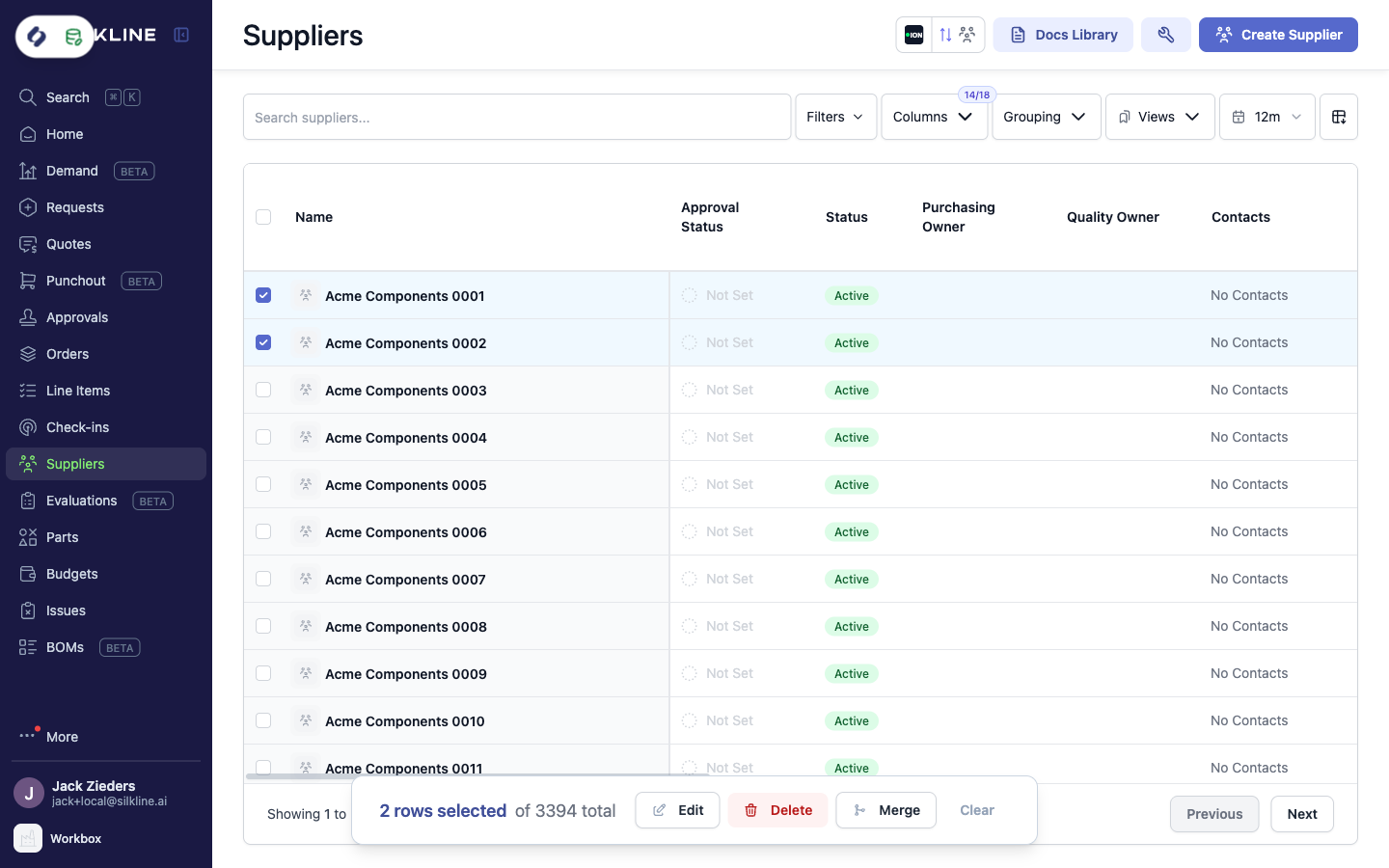
<table><thead><tr><th width="264">Entry point</th><th>When to use it</th></tr></thead><tbody><tr><td><strong>Two selected rows → Merge</strong></td><td>You already spotted the duplicate pair on the Suppliers, Parts, or Locations table. With <a href="/administration-tools/data-cleaning-mode.md">data cleaning mode</a> on, select exactly two rows and click <strong>Merge</strong> on the selection toolbar. The pair opens in the merge editor.</td></tr><tr><td><strong>Find duplicates</strong></td><td>You want Silkline to scan for duplicates. Open the Admin tools palette on the Suppliers or Parts page and choose <strong>Find supplier duplicates</strong> / <strong>Find part duplicates</strong>. See <a href="#the-duplicates-queue">The duplicates queue</a> below.</td></tr><tr><td><strong>Merge Records command</strong></td><td>You want to merge any pair of any supported record type. Open the command palette (<code>⌘K</code>) and run <strong>Merge Records</strong> — the editor opens with free pickers for the record type and both records.</td></tr></tbody></table>

<figure><img src="https://2684497859-files.gitbook.io/~/files/v0/b/gitbook-x-prod.appspot.com/o/spaces%2FwPsevXC0g5kNMF7GTyPN%2Fuploads%2Fgit-blob-7f25e47df009bb13f18a505baafdf3cb90a19d5d%2Fmerge-selection-action.png?alt=media" alt="Suppliers table with two rows selected and a Merge action on the floating selection toolbar"><figcaption><p>Selecting exactly two rows offers the Merge action</p></figcaption></figure>

## The merge editor

The **Merge Records** editor is where you review and control exactly what the combined record looks like before anything happens.

<figure><img src="https://2684497859-files.gitbook.io/~/files/v0/b/gitbook-x-prod.appspot.com/o/spaces%2FwPsevXC0g5kNMF7GTyPN%2Fuploads%2Fgit-blob-58e814efa1e0b96c58601a34355d8bd38d44d6fc%2Fmerge-records-editor.png?alt=media" alt="The Merge Records editor showing survivor and absorbed pickers, field-by-field value decisions, and owned reference collection choices"><figcaption><p>The Merge Records editor: pick the survivor, then decide fields and related data</p></figcaption></figure>

### Survivor and absorbed

The left sidebar shows the two records: **Keep · survivor** and **Merge in · absorbed**. Use **Swap** to flip which record survives. When the merge was started from a locked pair (a table selection or the duplicates queue), the records are fixed; from the Merge Records command you can search for any two records of the chosen type.

The summary at the top shows each record's creation date and integration links, to help you decide which one to keep.

{% hint style="info" %}
If one of the records is linked to an integration (for example, synced from your ERP), keep that one as the survivor so the link stays intact.
{% endhint %}

### Field values

The **Field values** section compares every field. Identical fields are collapsed — the survivor keeps its values. For each field that differs, choose the **Survivor** or **Absorbed** value with the per-field radio buttons, or use the quick selects on the right to set every field at once.

### Owned references

**Owned references** are the collections the record owns — for a supplier: addresses, contacts, documents, evaluations, screenings, tags, and so on. For each collection, choose what the merged record keeps:

<table><thead><tr><th width="164">Choice</th><th>Result</th></tr></thead><tbody><tr><td><strong>Survivor</strong></td><td>Keep the survivor's collection; the absorbed record's entries are removed.</td></tr><tr><td><strong>Union</strong></td><td>Keep both records' entries.</td></tr><tr><td><strong>Absorbed</strong></td><td>Replace the survivor's collection with the absorbed record's entries.</td></tr></tbody></table>

Each option shows the row count it would keep. Expand a collection to inspect the underlying rows.

### Records pointing at this record

The final section lists everything else that references the absorbed record — orders, quote line items, and other dependents. Most of these **move to the survivor** automatically; entries that cannot be repointed are labeled as either unlinked or deleted with the absorbed record, so there are no surprises.

### Executing the merge

Click **Merge records**. A toast confirms the result — for example, `Merged "Acme Components 0002" into "Acme Components 0001"` — and the absorbed record is permanently deleted.

After a successful merge, the editor remembers your choices for that record type: the next merge starts from the same strategy, with a note — *Starting from the choices your last supplier merge used* — and a **Reset to defaults** link.

{% hint style="danger" %}
A merge permanently deletes the absorbed record and cannot be undone. Review the field decisions and reference sections before executing.
{% endhint %}

## The duplicates queue

**Find supplier duplicates** and **Find part duplicates** (in the Admin tools palette) scan your whole table and score every candidate pair, then present the likely duplicates as a work queue.

<figure><img src="https://2684497859-files.gitbook.io/~/files/v0/b/gitbook-x-prod.appspot.com/o/spaces%2FwPsevXC0g5kNMF7GTyPN%2Fuploads%2Fgit-blob-aa1362a6ec3d4834338e74eac9d4232b092c56fd%2Fduplicates-queue.png?alt=media" alt="The Supplier duplicates queue listing scored pairs with Keeps, Merges away, Why matched, Status, and Merge actions"><figcaption><p>The duplicates queue scores every candidate pair and lets you merge from the list</p></figcaption></figure>

Each row is a candidate pair:

<table><thead><tr><th width="177">Column</th><th>Meaning</th></tr></thead><tbody><tr><td><strong>Match</strong></td><td>The similarity score (higher is more likely a duplicate). The queue sorts by score.</td></tr><tr><td><strong>Keeps</strong></td><td>The record the merge would keep as the survivor.</td></tr><tr><td><strong>Merges away</strong></td><td>The record the merge would absorb and delete.</td></tr><tr><td><strong>Why matched</strong></td><td>The signals behind the score (for example <em>Same name</em>) and how the survivor was chosen (for example <em>Keeps: older record</em>).</td></tr><tr><td><strong>Status</strong></td><td><em>Ready</em>, <em>Merging</em>, <em>Merged</em>, <em>Failed</em>, or <em>Already merged</em> (the pair's absorbed record was removed by an earlier merge in the queue).</td></tr></tbody></table>

For each pair you can:

* **Swap which record is kept** with the swap button, when the suggested direction is wrong.
* **Merge** the pair directly from the list. Queue merges use the standard strategy — the survivor keeps its field values and related records move to it. For field-level control over a pair, merge it from a table selection or the Merge Records command instead.
* Skip it — the queue is a suggestion list; nothing merges without your click.

Use **Re-scan** after cleanup to score the table again. The scan runs on demand and is not stored, so the queue always reflects the current data.
